Cash Flow Toolkit | Spreadsheet, App + AI Skill
Cash Flow Toolkit | Spreadsheet, App + AI Skill
Reach month-end with a clearer view of the cash you recorded.
You have client payments, a software bill, and money moved from Bank to Cash. This English toolkit gives freelancers and solo service businesses a structured place to enter those records and review the month.
- See cash in, cash out and operating cash surplus for your chosen period.
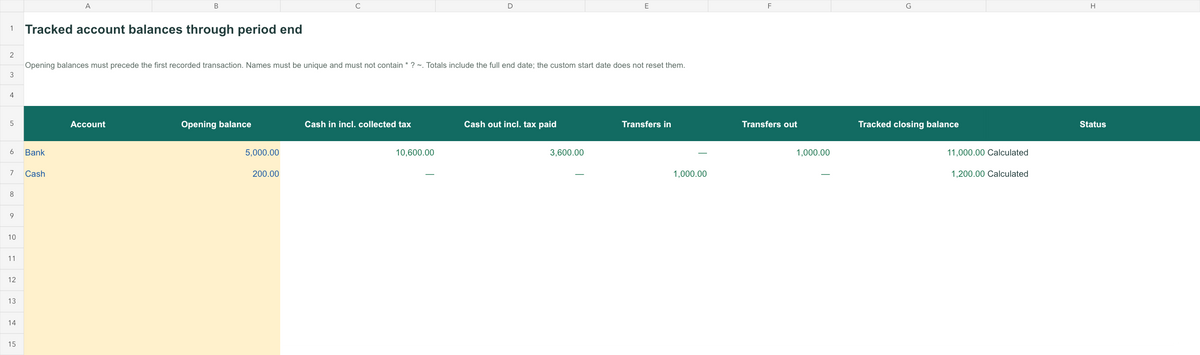
- See where your recorded cash sits across the accounts you track.
- Find entries that need attention before relying on the totals.
Choose the way you prefer to work
Use prepared spreadsheet cells or a focused offline browser app. Enter receipts and expenses, record internal transfers separately, then review summaries and validation alerts.
For example, moving $200 from your own Bank account to Cash reduces one tracked balance and increases the other. It adds $0 to operating income. If the destination account is unknown, the transfer is flagged and excluded in full until corrected. This example and all included sample records are fictional.
Your download includes
All four parts arrive in one ZIP.
- English XLSX cashbook: monthly budget, period comparison, illustrated tutorial and workbook screenshots.
- Offline browser app: transactions, transfers, accounts, date settings and a monthly chart.
- Cash Flow Workbench Skill: a deterministic local calculation engine, input contract and optional MCP adapter.
- Developer resources: desktop project-source generator and templates, plus Start Here instructions and actual app previews.
Before you choose
Separate workspaces. The spreadsheet and app keep independent data, with no XLSX import or sync. The app accepts compatible USD JSON only; export and complete the download before closing, then import that file to continue. Edits are not saved automatically. Each workspace supports 500 transactions, 100 transfers and 20 accounts. The workbook adds 12 monthly budget rows; its currency label does not convert money.
Optional technical setup. The browser app needs no Node or model key. Skill tools require Node.js 22.14+ and a compatible, authorized host; MCP requires dependency installation and host setup. Desktop resources generate source only; built binaries, installers, signing and notarization are not included. Building later requires dependencies and runtime downloads.
Checked scope. Basic WPS for macOS scenarios and save/reopen, plus scoped Chrome on macOS overview, invalid-transfer and JSON checks, have passed. Excel, Google Sheets, every agent host and native desktop execution remain untested.
For manual operating-cash records. Cash surplus differs from accounting profit. Bank connections, reconciliation, invoicing, forecasts, automatic tax calculation, owner capital/drawings, loan-principal and refund workflows are outside this version. Keep backups and review excluded records.
Quick answers before you buy
How does the free calculator differ from the paid toolkit?
The free freelancer income and expense calculator compares two totals for the same period, showing a cash surplus or shortfall before income taxes. It keeps no transaction history. The paid toolkit adds individual entries, internal transfers and summaries by account and period.
Are budgets and period comparison included in the app?
Monthly budgets and Period Comparison are features of the XLSX workbook. The offline app has its own transactions, transfers, accounts, date settings and monthly chart. The spreadsheet and app use separate data, with no sync or XLSX import.
Are my records sent to an AI service?
The offline app itself does not automatically upload your entries. Its basic features do not require an AI account. If you use the optional Skill, the agent host or model service may receive the records and results you provide, under its own data policies.
无法加载取货服务可用情况